
Authentication and Authorization
Authentication Model
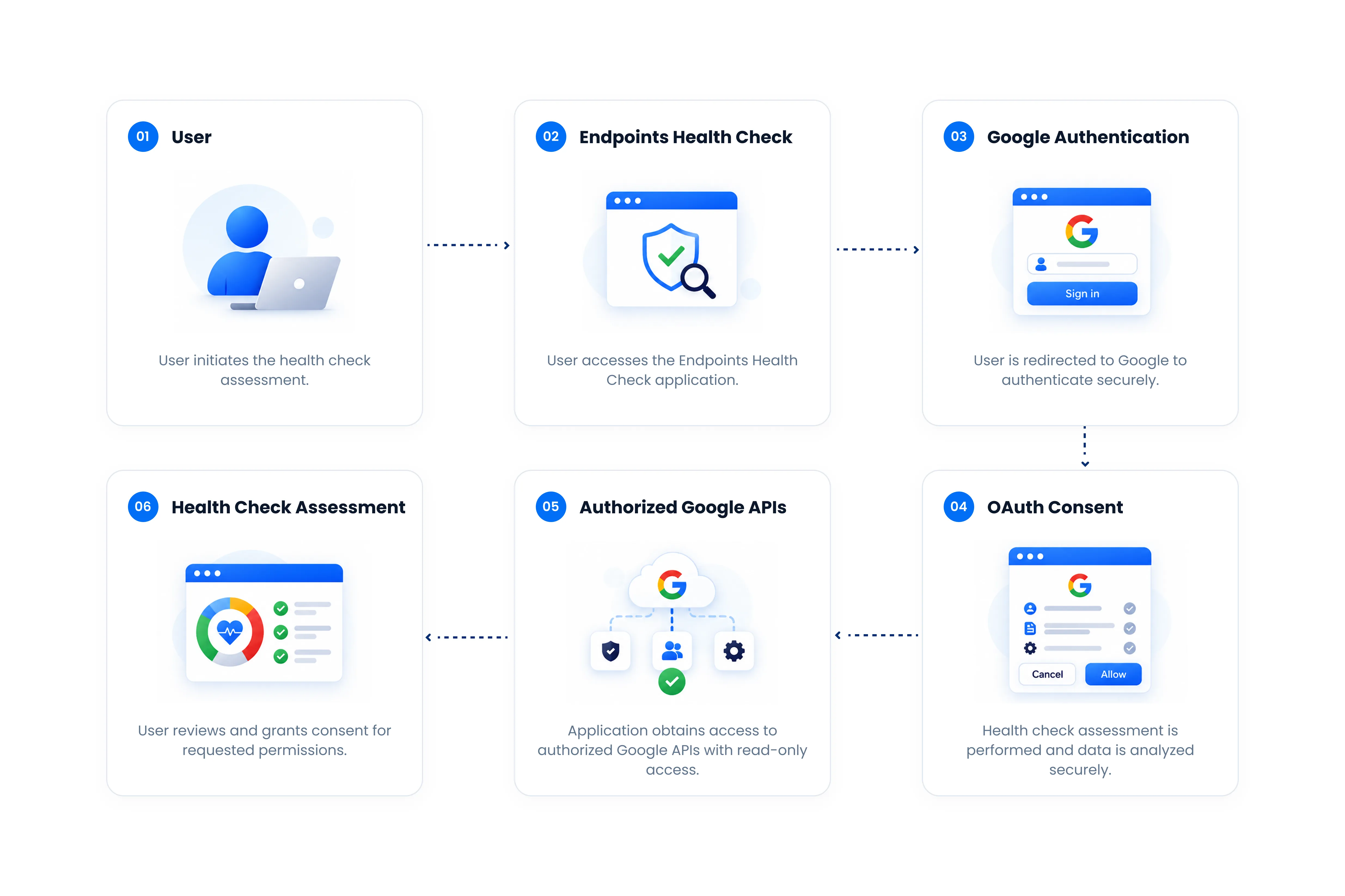
The Health Check uses Google-based authentication and authorization to allow a customer administrator to access the application and permit the application to retrieve required administrative configuration data from the customer's Google Workspace admin console. The final design should distinguish authentication of the user from authorization to call Google APIs.
The solution uses two authentication flows, serving different purposes within the platform:
| Authentication Flow | Purpose | How It Is Used |
|---|---|---|
| Application Sign-In Authentication | Identifies the user accessing the Endpoints Health Check application. | The user signs in with their Google account to establish their identity and access the Health Check application. |
| Google API Authorization | Grants the Health Check permission to retrieve the Google Workspace, Chrome, licensing, and policy information required for the assessment. | An authorized administrator provides OAuth consent for the requested scopes. The resulting authorization is used by the Health Check services when communicating with the required Google APIs. |
Google API Authorization Flow
When an administrator starts a health check, the application requests authorization for the Google API scopes required by its assessment checks. These permissions allow the Health Check to read the relevant configuration and administrative information from the customer's Google environment.
The retrieved information is then evaluated by the Health Check engine to determine the organization's configuration status and generate the health-check results.
The application currently requests the following scopes:
| OAuth Scope | Purpose in the Health Check |
|---|---|
cloud-identity.policies.readonly | Reads Cloud Identity policies required for applicable policy and security assessments. |
admin.directory.device.chromeos.readonly | Reads ChromeOS device metadata required for device-related assessments. |
admin.directory.user.readonly | Reads user information required for applicable organizational and configuration checks. |
admin.directory.orgunit.readonly | Reads the organization's OU structure so policies and assessment results can be evaluated at the appropriate organizational-unit level. |
admin.directory.rolemanagement.readonly | Reads delegated administrator role information required for applicable administrative and security checks. |
admin.reports.audit.readonly | Reads Google Workspace audit information required for applicable activity and security assessments. |
chrome.management.reports.readonly | Reads reporting information for managed Chrome browsers and devices. |
chrome.management.policy.readonly | Reads policies applied to managed Chrome browsers and ChromeOS devices so their configurations can be assessed. |
apps.licensing | Provides access to Google Workspace licensing information required for license-related assessments and insights. |
admin.directory.customer.readonly | Reads customer-level information about the Google Workspace environment. |
cloud-platform | Provides access required for supported Google Cloud services and resource-level operations used by specific Health Check functionality. |
How Authentication Fits into the Architecture
The first authentication flow establishes who the user is, while the second authorization flow determines which Google environment information the Health Check is permitted to access.
Once authorization is granted, the Health Check backend uses the authorized access to communicate with the APIs shown in the architecture diagram. The collected configuration information is then used only by the relevant assessment checks and supporting application functionality.
Read-Only Access to Customer Environment
Although Endpoints Health Check connects to the customer's Google Workspace environment through an authorized administrator account, the Health Check is designed to assess the environment rather than modify it.
The connection allows the application to retrieve the configuration, policy, device, organizational, security, and other administrative information required to perform the health assessment. The Health Check does not make configuration changes to the customer's Google Admin Console as part of the assessment process.
| Access Area | How Endpoints Health Check Uses It |
|---|---|
| Google Admin Console | Connects to the customer's environment through authorized Google APIs. |
| Policies & Settings | Retrieves existing configurations for evaluation; the assessment does not modify them. |
| Organizational Units | Reads the OU structure and applicable configurations to perform OU-level assessments. |
| Users & Devices | Retrieves information required by applicable health-check tests without modifying user or device configurations. |
| Security & Audit Information | Reads relevant information required to evaluate applicable security checks. |
| Assessment Results | Uses the retrieved information to identify configuration gaps and provide findings and recommendations. |
Permission Requirements
Required Permissions Overview
To successfully run all Endpoints Health Check assessments, the user must have sufficient administrative access to retrieve the configuration, policy, licensing, device, and audit information evaluated by the tool.
Most checks rely on authorized read access to Google Workspace and Chrome management APIs. However, some checks, particularly those using the Cloud Identity Policy API, require the assessment to be authorized by a Google Workspace Super Admin.
| Required Permission / Access | Health Checks Using This Permission | Purpose |
|---|---|---|
Super Admin Cloud Identity Policy Accesscloud-identity.policies.readonly |
| Allows the Health Check to retrieve Workspace-wide DLP rules, sensitive-data detectors, and identity and authentication security policies through the Cloud Identity Policy API. This access must be granted by a Workspace Super Admin — the API rejects non-super-admins at runtime regardless of the scope grant. If it is unavailable, HC-12, HC-13 and HC-14 fall back to a Chrome connector check and HC-23 reports Unknown. HC-07 also uses this API to detect URL-navigation DLP triggers. If the API call fails, HC-07 falls back to the Chrome policy signal alone rather than reporting an Unknown status. |
GCP IAM (organization-level) Google Cloud — Context-Aware Access Readcloud-platformroles/accesscontextmanager.policyReader |
| Allows access levels and Workspace app assignments to be retrieved from the Access Context Manager API, with the GCP organization resolved through the Cloud Resource Manager API. This needs an IAM grant in the Cloud Console in addition to the OAuth consent — a Workspace Super Admin can self-assign the Organization Administrator role to make it. Without the grant, HC-02 reports Unknown. |
User Directory Read Accessadmin.directory.user.readonly |
| Retrieves user information to assess MFA status, identify inactive accounts, and resolve super-admin assignments. Active, non-suspended user data is also used to validate CEP licence assignments and exclude orphaned licences from reporting. |
Organizational Unit Read Accessadmin.directory.orgunit.readonly |
| Allows the organizational unit tree to be retrieved, so an audit can be scoped to the whole tenant or to a selected set of OUs and each policy or user result can be resolved against the correct OU. |
Admin Role Read Accessadmin.directory.rolemanagement.readonly |
| Allows administrator roles and role assignments to be retrieved for the least-privilege assessment. |
Chrome Policy Read Accesschrome.management.policy.readonly |
| Allows Chrome browser and ChromeOS user and device policies to be resolved and evaluated at each organizational unit — Safe Browsing, extensions, URL filtering, reporting, updates, printing and clipboard controls, DLP connectors, enrollment and device settings, and other configurations. |
ChromeOS Device / Inventory Read Accessadmin.directory.device.chromeos.readonly |
| Allows ChromeOS device records to be retrieved for enrollment, per-OU device distribution, and stale-device assessments. |
Managed Browser Reporting Accesschrome.management.reports.readonly |
| Allows managed-browser counts and deployed Chrome version data to be retrieved from the Chrome Management API for the inventory and version-spread assessment. |
License Information Accessapps.licensing |
| Determines whether CEP licences are assigned to active users and identifies the applicable licensed capabilities. A 403 response is treated as “not subscribed,” so CEP-dependent checks return Unknown rather than affecting the assessment score. |
Customer Information Read Accessadmin.directory.customer.readonly |
| Allows the tenant’s canonical customer ID and primary domain to be retrieved. The Licensing API requires this ID; without the permission, the tool falls back to a domain-based heuristic, which can cause the license-dependent checks to report Unknown. |
Audit & Reports Read Accessadmin.reports.audit.readonly |
| Allows the Health Check to retrieve the relevant Chrome and Workspace audit activity through the Reports API. |
Permission Levels and Assessment Coverage
As explained above, different Health Check points require different permission levels to retrieve the information needed for assessment. To achieve complete assessment coverage across all supported Health Check points, the user must provide all of the required permissions, including the access required for checks that depend on the Cloud Identity Policy API.
The Health Check will perform all assessments that are supported by the permissions granted by the customer. If a required permission is not available, only the checks dependent on that permission will be affected; the remaining checks can continue to be assessed normally.
For example, certain Context-Aware Access and DLP-related checks use the Cloud Identity Policy API, which requires authorization from a Google Workspace Super Admin. If the customer chooses not to provide this level of access, those dependent checks cannot be fully assessed.
Behavior When Required Permissions Are Not Provided
When the Health Check does not have sufficient permission to retrieve the information required for a particular check, that check will be reported as Unknown.
This ensures that a lack of access is not incorrectly interpreted as a security or configuration issue within the customer's environment. An Unknown result indicates that the Health Check could not obtain sufficient information to determine the status of that check.
For example, the DLP assessment returns an Unknown status when the Cloud Identity API cannot be accessed because of conditions such as a missing scope, the API being unavailable, or authorization by a non-Super-Admin account.
Data Stored by Endpoints Health Check
This section describes the data Endpoints Health Check collects, where it comes from, and what is stored. Data is used solely to perform the assessment and provide security and configuration insights for your environment.
Data Gathered Directly from the User
| Category | Data Collected | How It Is Used |
|---|---|---|
| Google Sign-In Identity | Permissions requested: openid, email, profile. Four profile fields are read: user ID, email address, name, and profile picture. | Authenticates the user and manages the session. These fields are also held in a session token in a secure, HttpOnly browser cookie. |
| Feedback Form | Name, email address, feedback text, and an optional screenshot. | Submitted feedback is recorded in Jira Cloud so product issues and suggestions can be tracked. |
| Data-Sharing Consent | Consent choice (yes/no). | Records the customer's data-sharing preference. |
| Custom Check Weights | Customer-defined weighting for each health check. | Personalizes how health scores are calculated. |
| Organizational Unit Selection | IDs of the organizational units (OUs) selected for assessment. | Scopes the assessment to the whole tenant or selected OUs. |
| Ask Gemini Chat | Messages typed into the optional Ask Gemini feature. | Forwarded to the Gemini API to generate a response when the feature is enabled. Chat messages are held in memory only and are not stored in the Health Check database. |
Data Encryption
Endpoints Health Check applies security controls to protect customer information throughout the assessment lifecycle.
Encryption in Transit
Information transmitted between the customer's browser, the Endpoints Health Check application, Google APIs, and supporting services is protected using encrypted network connections.
TLS is used to protect information while it is transmitted between authorized systems.
This helps protect customer information from unauthorized interception during transmission.
Encryption at Rest
Persisted Endpoints Health Check data is protected using encryption at rest.
OAuth credentials that authorize access to a customer's Google Workspace environment are encrypted by the application using AES-256-GCM authenticated encryption before being written to storage. These credentials are decrypted only in memory at the point of use. Each stored value is protected using a unique nonce, and the authenticated encryption mechanism ensures that stored credentials cannot be silently altered without detection.
Generated assessment reports and in-progress assessment results are also encrypted by the application using AES-256-GCM before being written to storage, using the same encryption mechanism. A separate derived metrics projection containing aggregate scores, ratings, and per-check pass/fail statuses is maintained to support authorized reporting queries. This projection does not contain evidence text or credentials and is not additionally encrypted at the application layer.
All application data is stored in Google Cloud SQL for PostgreSQL, which automatically encrypts data before it is written to disk using AES-256 encryption with Google-managed keys. This means that application-level encryption applied to credentials and assessment reports provides an additional layer of protection on top of the platform-level encryption at rest. Encryption keys are securely stored in Google Secret Manager and are never stored in application code or configuration.
The only customer-originated data stored outside this platform is information voluntarily submitted through the in-app feedback form. Submitted feedback is recorded in Jira Cloud and may optionally include a screenshot provided by the user.
Encryption at rest protects stored information so that the underlying data cannot be meaningfully accessed without the appropriate authorization and encryption controls.
Non-Disclosure Terms
All information collected, processed, transmitted, stored, or generated through the Endpoint Health Check service will be treated as confidential and will be protected against unauthorized access, disclosure, use, alteration, or distribution.
Confidential Information
As a diagnostic tool, Endpoints Health Check collects metadata through authorized Google APIs. Endpoint Health Check categorizes the information collected as follows:
Collected Metadata Categories:
- Organizational Metadata: Includes organizational unit structures, domain information, and administrative role assignments. This helps the tool understand how the Google environment is organized.
- Device and Telemetry Data: Includes supported device metadata such as enrollment status, OS version, last check-in, and basic health information. This data supports device-level security and configuration assessments.
- Policy Configuration Data: Includes settings related to Safe Browsing, URL controls, extensions, Chrome policies, and Cloud Identity. These configurations are evaluated to identify potential policy or security gaps.
- Audit and Usage Information: Contains relevant administrative activity, OAuth activity, and license assignment information available through authorized Google APIs. This helps identify security observations and license utilization opportunities.
- Managed Profile Data: Metadata related to managed Chrome browser profiles and installed applications or extensions. This information is used to assess browser management, configuration, and security posture.
- Administrative Identity Information: Basic information such as the connecting administrator’s name and email address. This information is used for authentication, session management, and access control within the application.
Purpose and Permitted Use
Information retrieved by Endpoints Health Check is used solely to perform the assessment and provide security and configuration insights for the customer environment. This includes:
- Calculating Health Scores for selected Organizational Units (OUs).
- Identifying orphaned or underutilized licenses, including CEP, Google Workspace, and ChromeOS licenses.
- Providing supporting evidence and recommended remediation actions for identified security and policy gaps.
- Supporting the Ask Gemini AI feature for natural-language security queries.
The Ask Gemini AI feature can be enabled or disabled by the user. Workspace metadata processed through this feature is used only to respond to the administrator's queries and is not used to train or improve generalized AI/ML models.
Access Control
Endpoints Health Check implements controls designed to restrict access to customer information and protect assessment data.
- Read-Only Access: Google environment information is accessed through authorized APIs with read-only permissions where applicable. The assessment does not modify or delete customer configurations.
- Encryption: Data is protected using TLS during transmission and encryption controls, including AES-256-GCM, for stored application data.
- Enterprise Infrastructure: The service is hosted on Google Cloud Platform (GCP), using managed cloud infrastructure and security controls.
Customer Rights
Customers retain control over access to their environment and assessment information.
- Right to Access: Customers can review assessment information through generated and downloadable reports.
- Right to Erasure: Customers may request deletion of their organizational and assessment data.
- Right to Revoke: Customers may revoke application access at any time through their Google Account security settings.
Protection of Customer Data
Endpoints Health Check applies technical and organizational safeguards designed to protect customer information against unauthorized access, disclosure, modification, loss, or destruction.
Security measures may include:
- Encryption of data during transmission and storage.
- Authentication and access control mechanisms.
- Secure management of encryption keys and credentials.
- Logging and monitoring of relevant security events.
- Secure storage and controlled data transfer mechanisms.
- Vulnerability management and security updates.
- Secure development and deployment practices.
- Periodic review of access permissions.
Data Sharing & Disclosure
Endpoints Health Check does not sell customer data. Customer information is disclosed or processed by third parties only where necessary to provide the service or where legally required.
- Google Cloud Platform: Used to host and operate the Endpoints Health Check infrastructure.
- Gemini API: Relevant policy or Workspace metadata may be processed when the Ask Gemini AI feature is used to generate natural-language responses.
- Legal Requirements: Information may be disclosed when required by applicable law or a valid request from an authorized public authority.
Endpoints Health Check's use of raw or derived data received through Google Workspace APIs is intended to comply with the Google Workspace API User Data and Developer Policy, including its Limited Use requirements. Google Workspace API data is not sold or used to create, train, or improve foundational or generalized AI/ML models.
Endpoints Health Check may also provide navigation links to external services such as the Google Admin Console. Data handling performed directly by those external platforms is governed by their respective privacy and security practices.
Security Incident and Unauthorized Disclosure
Suspected or confirmed unauthorized access, disclosure, loss, alteration, or compromise of customer information is handled through the applicable security incident response procedures.
Where required by applicable law or contractual obligations, affected customers will be notified within the required timeframe and provided with relevant information regarding the incident, its potential impact, and applicable remediation actions.
Data Retention
Endpoints Health Check retains customer health assessment reports to allow organizations to review previous assessments and track security improvements over time.
Customers may request deletion of their account and associated assessment data. Following a valid deletion request, the applicable customer data will be permanently deleted from the Endpoints Health Check system within 30 days.
Customer Responsibility
Customers are responsible for ensuring that their use of Endpoints Health Check complies with their internal policies, applicable laws, and regulatory requirements.
Customers should not intentionally submit credentials, secrets, highly sensitive personal information, or other information outside the intended scope of the service unless the information is specifically supported and required for an authorized Endpoint Health Check function.
Confidentiality Commitment
Endpoints Health Check is designed to maintain the confidentiality, integrity, and security of customer information throughout the assessment lifecycle.
Appropriate technical and organizational safeguards are maintained to help prevent unauthorized access, use, modification, or disclosure of customer information.